

Introduction
The GF_Field_Coupon class extends the GF_Field class, also known as the Field Object, it’s responsible for determining how the Coupon field is rendered when the form is displayed and how it’s value is handled during and after submission.
Properties
These are the properties used by the Coupon field, which can be found in the Field Object, available to many of the hooks throughout Gravity Forms and some add-ons.
| Parameter | Type | Description |
|---|---|---|
type | string | The field type, which in this case is coupon. |
id | integer | The field ID. |
label | string | The field label that will be displayed on the form and on the admin pages. |
adminLabel | string | The label to be used on admin pages instead of the label, useful for fields with long labels. |
isRequired | boolean | Determines if the field requires the user to apply a coupon. Marking the field as required will prevent the form from being submitted if a coupon is not applied. Default is false. |
errorMessage | string | The custom error message to be displayed if the field fails validation. |
placeholder | string | The display only text to be used with the placeholder attribute of the input the user enters the coupon code into, it is not included in submissions. |
formId | integer | The ID of the form this field is located on. |
pageNumber | integer | The form page this field is located on. Default is 1. |
conditionalLogic | array | An associative array containing the conditional logic rules. See the Conditional Logic Object for more details. |
description | string | The field description. |
cssClass | string | The custom CSS class or classes to be added to the li tag that contains the field. |
failed_validation | boolean | Has the field failed validation. Default is false. |
validation_message | string | The error message to be displayed. |
descriptionPlacement | string | The field description position. Empty when using the form defaults, a value of ‘below’ to position the description below the input container, or a value of ‘above’ to position the description above the input container. |
labelPlacement | string | The field label visibility. Empty when using the form defaults or a value of ‘hidden_label’. |
allowsPrepopulate | boolean | Determines in the field value can be dynamically populated. Default is false. |
inputName | string | The parameter name used when dynamically populating the field. Only used when allowsPrepopulate is true. |
Dynamic Population
Since version 2.9.2 the Coupon field supports being dynamically populated with one or more coupon codes. Multiple codes should be passed as a string in the following format:
50OFF,25OFF
Calculations Support
Unfortunately the Coupon field can’t currently be used with calculations; we do have this on the feature request list.
Conditional Logic Support
The Coupon field is supported by conditional logic; you can configure conditional logic rules on other fields based on the code entered in the Coupon field.
$entry Value
The Coupon field stores the submitted coupon codes in the Entry Object as a string in the following format:
50OFF,25OFF
If you need to retrieve the entry value in a flexible way which would work with multiple forms where the Coupon field ID could be different we would recommend using the get_coupons_by_codes() method
Merge Tags
The field merge tag available via the merge tag drop down in notifications and confirmations will return the field entry value.
{[Field Label]:[field_id]} e.g. {Coupon:3}
The Coupon field does not have any modifiers for the field merge tag.
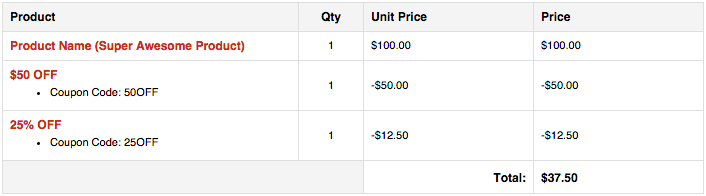
The {all_fields} merge tag will output the field entry value like any other field, however, the coupon codes will also be listed in the pricing summary table.
Useful Methods
GF_Field_Coupon inherits it’s available methods from GF_Field and overrides a few of them where necessary to provide its required appearance and functionality. Here are a few methods which can be useful when writing custom code.
get_value_export()
The get_value_export() method formats the entry value before it is used in entry exports and by framework add-ons that integrate with third-party services, however, you can use it in your custom code when interacting with the Form Object, Field Object and Entry Object.
Usage Examples
// if you don't have the $field object you can get it like so:
$field = GFAPI::get_field( $form_or_form_id, $field_id );

// if you have access to the $field object
$value = $field->get_value_export( $entry );
| Parameter | Type | Description |
|---|---|---|
$entry | Entry Object | The entry from which the field value should be retrieved. Required. |
$input_id | string | The ID of the field for which the value should be retrieved. Required when not using $field. Defaults to the $field->id property when not supplied. |
Returns string
The entry value formatted as {couponName} ({couponCode}: {discount}). Multiple codes will be comma separated e.g. $50 OFF (50OFF: -$50.00), 25% OFF (25OFF: -$12.50)
Source Code
The GF_Field_Coupon class is located in class-gf-field-coupon.php in the Gravity Forms Coupons Add-On folder of your sites plugins directory.
The GF_Field class is located in includes/fields/class-gf-field.php in the Gravity Forms folder of your sites plugins directory.