

Overview
This how-to article shows you how to receive email notifications when a Gravity Forms add-on encounters an error when interacting with an external API. The solution uses a custom notification event that triggers whenever an add-on fails to complete its API operation, such as when a service rejects a request or when there’s a connection issue.
What We Will Build
When an add-on encounters an API error, a custom notification event is triggered, and an email is sent to the address you specify with details about the entry and a link to view the specific error message in the entry notes.
Code Snippet
// Adds a custom notification event for add-on API errors.
add_filter( 'gform_notification_events', function ( $events ) {
    $events['addon_api_issue'] = 'Add-On API Issue';
    return $events;
} );

// Triggers the custom notification event when an add-on error occurs.
add_action( 'gform_SLUG_error', 'send_addon_error_email', 10, 4 );
function send_addon_error_email( $feed, $entry, $form, $error_message ) {
    GFAPI::send_notifications( $form, $entry, 'addon_api_issue' );
}
Note: Replace SLUG with the actual add-on slug.
Configure the Notification
After adding the code, create the notification that will be sent when an error occurs:
- Navigate to Forms > [Your Form] > Settings > Notifications.
- Click Add New to create a new notification.
- Give the notification a descriptive name (this appears in entry notes).
- From the Event dropdown, select Add-On API Issue.
- Configure the Send To email address.
- Add a subject line, for example, “API Error – Action Required”.
- Configure the message body.
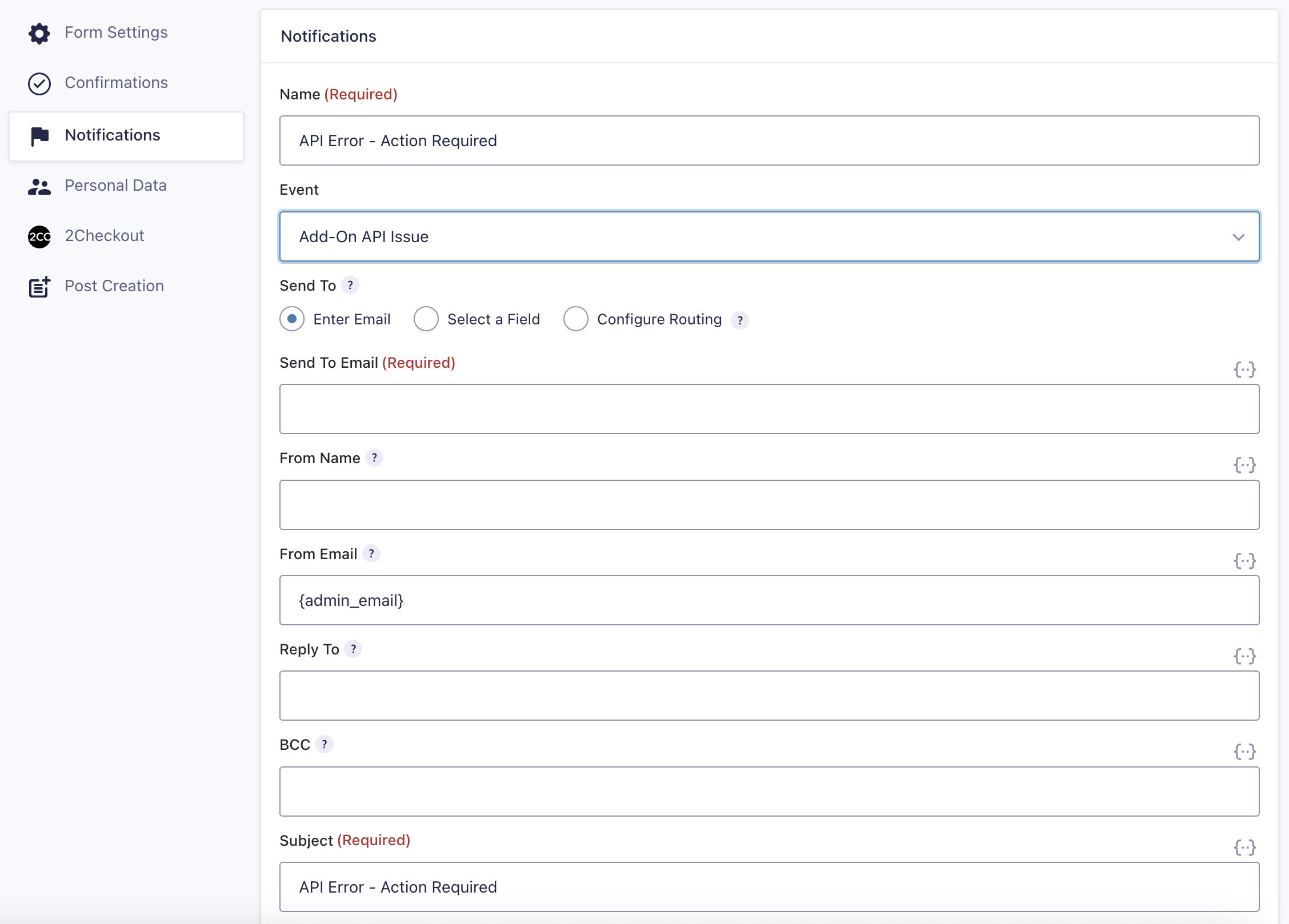
Note: You can use the {all_fields} merge tag to provide context about the form submission, and the {entry_url} merge tag to create a direct link to the entry where the add-on records the specific API error in the entry notes.
How it works
Custom Event Registration
The gform_notification_events filter adds “Add-On API Issue” as a new notification event option in the form notification settings.
Error Detection
The gform_{$SHORT_SLUG}_error action hook fires whenever a supported add-on encounters an API error. This includes service rejection, authentication failures, validation errors, or connection issues.
Notification Trigger
When an error occurs, GFAPI::send_notifications() sends any notifications configured to use the addon_api_issue event, passing along the entry data for use in merge tags.
Examples
Trigger a Notification on Mailchimp API Errors.
// Adds a custom notification event for Mailchimp API errors
add_filter( 'gform_notification_events', function ( $events ) {
    $events['mailchimp_api_issue'] = 'Mailchimp API Issue';
    return $events;
} );

// Triggers the custom notification event when a Mailchimp error occurs.
add_action( 'gform_mailchimp_error', 'send_mailchimp_error_email', 10, 4 );
function send_mailchimp_error_email( $feed, $entry, $form, $error_message ) {
    GFAPI::send_notifications( $form, $entry, 'mailchimp_api_issue' );
}
Customize
- Change the event name
Modify both event identifier values in the code (for example,addon_api_issueormailchimp_api_issue) to use a different name. The values in the filter and action must match exactly, but are not tied to any specific Gravity Forms add-on or filter name. For example, you could usemy_custom_event_nameas long as it’s the same in both locations:
// Adds a custom notification event for Mailchimp API errors
add_filter( 'gform_notification_events', function ( $events ) {
    $events['my_custom_event_name'] = 'Mailchimp API Issue';
    return $events;
} );

// Triggers the custom notification event when a Mailchimp error occurs.
add_action( 'gform_mailchimp_error', 'send_mailchimp_error_email', 10, 4 );
function send_mailchimp_error_email( $feed, $entry, $form, $error_message ) {
    GFAPI::send_notifications( $form, $entry, 'my_custom_event_name' );
}
- Send to multiple recipients
In the notification settings, add multiple email addresses separated by commas in the Send To field, or use conditional logic to route notifications based on form field values.
- Multiple add-ons on one form
If your form uses multiple add-ons, create separate notification events and action hooks for each add-on to identify which service encountered the error.
- Include error details
The$error_messageparameter contains the specific error returned by the API. You could modify the code to include this in the notification, though it’s also recorded in the entry notes.
Notes
The notification is sent after the entry is created and after add-on processing completes. The entry will be saved regardless of the API error.
Add-ons automatically log error details to the entry notes. The notification serves as an alert mechanism; you’ll still need to check the entry notes for the full error message.