

Introduction
Gravity Forms does not see, receive, or store any of the data that your forms collect. The benefit of a self-hosted solution for forms compared to a SaaS option is that you, the site administrator, can make the decisions for all the choices you make about how, where, and for how long to store your collected data. See this basic explainer article for more information on what Gravity Forms is.
An installed Gravity Forms core package will perform limited background data collection about the installation where it resides. This article explains the two types of reports that can be sent, and discusses the type of information collected.
See also this related article About Additional Data Collection.
Note that not all of the infrastructure required for the purposes listed in this article has been completed. Some of these capabilities are indicative of future planning or in-progress development. The sample payloads listed are for illustration purposes only, and data elements may be added to or removed as product needs evolve.
Types of Data Processes
There are two distinct processes that may send installed site information to us.
- Upgrade Checks (required)
- Anonymous Usage Telemetry (optional)
These processes share some basic environment details but serve quite different purposes. Both are described below.
About Upgrade Checks
Delivering secure, reliable updates to millions of self-hosted WordPress sites for Gravity Forms and its dozens of official add-ons requires more than comparing version numbers. The upgrade checks are the backbone of the update and licensing system, which uses a combination of environment and configuration data to prevent failed updates, ensure eligibility, and allow account-level management.
Upgrade checks are essential for maintaining software security and compatibility. They enable Gravity Forms to determine which version of the plugin you are running and the environment in which it is installed. This is vital information to serve appropriate update notifications and confirm licensing verification.
No user or personal data, email data, or form submission data is included in these requests. The information collected by your forms is not transmitted by any process.
WordPress itself triggers upgrade checks. They occur periodically and do not run on every page load. Counters are not reliant on database operations; they are maintained as simple, incremental processes on object creation to avoid database impact. Upgrade checks cannot be disabled in Settings (some optional usage data collection can be disabled, see below).
What They Are For
Upgrade Checks ensure your installation:
- Knows when a new update is available.
- Receives the correct files for your license and environment.
- Can be used to avoid update issues caused by incompatible PHP, MySQL, or WordPress versions.
- Enforce license terms and conditions (for example, single-site vs. multi-site activation).
- Provides the information needed for customers to manage licensed sites from their Gravity Forms account dashboard.
- Provides counters to approximate database usage.
How Upgrade Info Might Be Used
Delivering secure, reliable updates to millions of self-hosted WordPress sites requires more than comparing version numbers. The update and licensing system uses a combination of environment and configuration data to prevent failed updates, ensure eligibility, and allow account-level management.
| Upgrade Check Data | Purpose |
|---|---|
| License hash & site URL | Verifies your license anonymously |
| WordPress / PHP / MySQL versions | Enable the ability to perform compatibility checks before sending an update. |
| Plugins | Helps identify possible conflicts or dependencies (e.g., a Stripe Add-On version that requires a specific Gravity Forms version). |
| Theme details | Helps identify or confirm compatibility issues. |
| Multisite flag | Used for license verification. |
| Language locale (e.g., en_US) | Ensures the correct translation files are delivered. |
| Counters | Provides approximate counts of a selection of table objects (like forms or entries). This can help us identify large database constraints during update or rollback processes. These are simple counters that are incremented during creation processes to avoid database calls. As such, they are only approximations. |
During an update process, especially when dealing with critical core components or vital add-ons, we may temporarily stagger the availability of an update to limit it to smaller groups of sites based on criteria such as plugins and the theme in use. This helps us identify potential issues in a controlled manner as we move forward with a gradually widening rollout.
Sample Data
{
  "of": "gravityforms",
  "key": "01234567890abcd9876",
  "v": "2.8.12",
  "wp": "6.4.2",
  "php": "8.1.23",
  "mysql": "8.0.16",
  "tn": "Twenty Twenty-Two",
  "tv": "1.2",
  "plugins": [
    {"name":"Gravity Forms","version":"2.8.12","is_active":true},
    {"name":"Rank Math SEO","version":"1.0.226","is_active":true}
  ],
  "lang": "en_US",
  "total_forms": 30,
  "total_entries": 6700,
  "is_multisite": false
}
About Usage Data
What It Does
An opt-in telemetry process within the product can be used to communicate anonymous, opt-in usage metrics that are intended to help our product team identify trends, performance issues, and the environments in which our products exist.
This type of information helps Gravity Forms understand how different environments use the plugin. This data can be a key component to product design, timing of feature deprecations, improving product testing coverage, and improving reliability and long-term stability. It may include specific product usage data relevant to a release, as well as the basic counters as specified by upgrade checks.
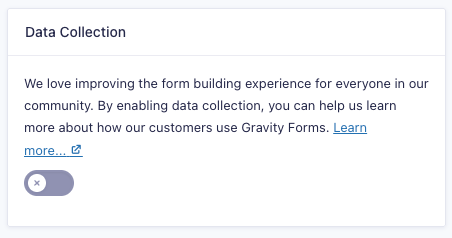
The provision of usage data is optional, and the usage data payload is only sent when data collection is enabled in the Form settings (see below). The information listed here is an example and may be changed or added to as the product evolves.
What’s Collected
Usage data includes much of the data of an upgrade check, plus the option of additional non-personal configuration details, such as:
- Whether logging or no-conflict mode is enabled.
- Which Gravity Forms theme is active (Orbital, Legacy, etc)
- WordPress environment information for performance analysis.
- Approximate usage counters (see section above).
Example Usage Telemetry Payload
{
  "key": "01234567890abcd9876",
  "dataCollection": 1,
  "wp_version": "6.6.1",
  "php_version": "8.1.28",
  "mysql_version": "10.5.25",
  "theme_name": "Divi Child",
  "theme_version": "1.0.0",
  "plugins": [
    {"name":"Gravity Forms","version":"2.8.6.1","is_active":true},
    {"name":"Object Cache Pro","version":"1.20.2","is_active":true}
  ],
  "gform_enable_logging": 1,
  "rg_gforms_default_theme": "gravity-theme",
  "total_forms": 30,
  "total_entries": 6700,
  "is_multisite": false
}
Usage data is aggregated and anonymous. It never includes form entries, user information, or any data that might identify any of your site visitors.
How Usage Info Might Be Used
Although all these possibilities may not be in product today, we envision that this type of data might be helpful in the future in a number of ways:
- Stability and performance – identify plugin and database usage to determine impact on performance.
- Support diagnostics – Helps identify conflicts or update blockers quickly.
- Product design – identify little-used (or misused) features and settings that may require revision, improvement, or even deprecation.
- Product quality – Improves testing coverage and release reliability.
Managing Your Usage Data Preference
You can disable usage data telemetry via a setting:
- In your WordPress dashboard, go to Forms → Settings → Data Collection.
- Uncheck the toggle.
Our Commitment
Gravity Forms remains committed to responsible data handling practices that help protect site owners and their users. You can also review our GravityForms.com visitor privacy policy here for more information on how we use data collected during site visits and transactions.